OllamaProxy
A normalizing proxy in front of Ollama: every model runs with exactly one configuration and stays in memory – no matter what Open WebUI, Home Assistant or agents send.
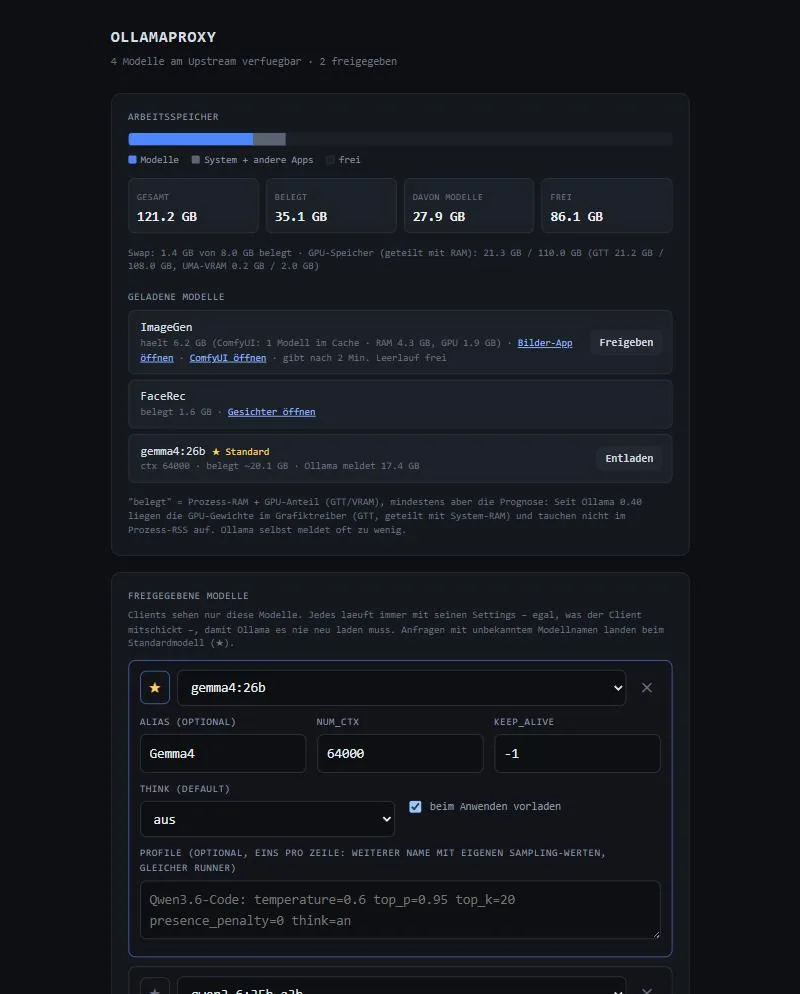
The screenshot shows the German interface – the app itself can be switched to English.
Why?
Every client sends its own settings to Ollama, above all the context size. Ollama then reloads the model every time, which takes seconds to minutes for large models. The proxy releases only selected models and enforces the same values for each. That way a single runner per model stays loaded.
All clients simply point at the proxy: port 11435 for Ollama clients and /v1 for OpenAI clients.
Features
Released models
Alias, context, keep_alive and think default per model; unknown names go to the default model.
Profiles
Extra names with their own sampling values on the same runner – e.g. a coding profile, without reloading.
OpenAI → native
Translates /v1/chat/completions to the native API, including streaming, tools and images.
Image and audio helper
Models without vision or audio get media described by a helper model first.
Watcher
Reloads permanent models automatically after a restart – only if they fit into memory.
Real memory view
Measures the real usage per model, also on unified-memory systems such as AMD Strix Halo.
Modules
Other services on the same machine attach as modules: they are listed in modules.json, appear with a link and their memory usage in the UI, and the watcher frees their memory when idle.
Working together
The proxy is the AI hub. WhisperNotes, BasaltNotes, ImageGen and Tabletop Forge get their language model here and follow the enforced context size.
Quick start
git clone https://github.com/Poldion/OllamaProxy.git ~/ollama-proxy/app
cp ~/ollama-proxy/app/deploy/stack.env.example ~/ollama-proxy/stack.env
cd ~/ollama-proxy/app && docker compose --env-file ../stack.env up -d --build
Without Docker: pip install -r requirements.txt and python ollama_proxy.py in front of an existing Ollama. Then open http://<host>:11435/.