FaceRec
Local face recognition for the doorbell in Home Assistant: "Anna is at the door." No cloud, learning via a button in the notification.
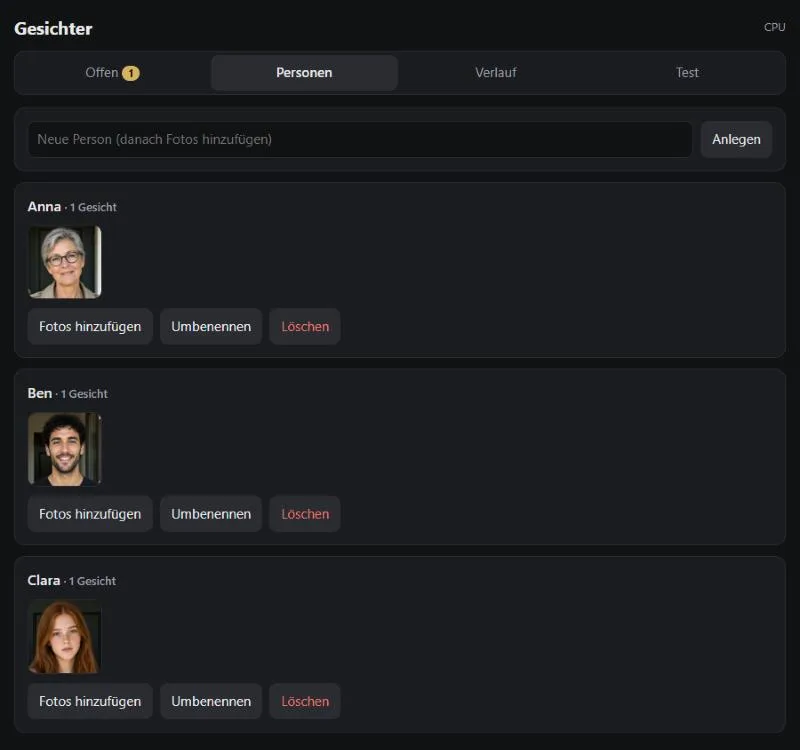
The screenshot shows the German interface – the app itself can be switched to English.
How it works
When someone rings, Home Assistant sends the picture to the service. It finds the faces, compares them with the known people and answers with a sentence for a push notification or speech output. Unknown faces can be assigned to a person straight from the notification; similar unknown faces are grouped.
For a hallway camera the service can read a video stream for a few seconds and track every face. That way each person is reported once, even if several arrive at the same time.
Features
Fast
~90 ms per image on the CPU, a few milliseconds with an AMD GPU.
Keeps learning
Assign unknown faces, train from photos, rename and merge people.
Correctable
"Wrong person" via a notification button. Recognised faces are kept for 48 hours for that.
Home Assistant
Ready-made package with REST commands and sensors, templates for the automations.
Working together
FaceRec is a standalone service for Home Assistant. If it runs on the same machine as the OllamaProxy, it attaches there as a module, with a link in the UI and its memory in the view. It has nothing to do with the tabletop part of the family.
Quick start
git clone https://github.com/Poldion/FaceRec.git && cd FaceRec
mkdir -p ~/facerec/data && cp facerec.env.example ~/facerec/facerec.env   # set HA_URL and HA_TOKEN
docker compose --env-file ~/facerec/facerec.env up -d --build
# with an AMD GPU: add -f docker-compose.rocm.yml
Then open http://<host>:8191/ and add the package homeassistant/facerec.yaml to Home Assistant.
License
buffalo_l) are licensed for non-commercial research only and are not included.